
Key points:
- Email traffic is often miscategorized in Google Analytics, as well as other analytics and reporting tools
- Email traffic ends up in channel groups such as Other or Referral
- Using automated UTM links from email marketing platforms usually doesn’t fit with your own measurement taxonomy
- The job of UTM tags is to help attribute conversions and determine the most effective email marketing strategy
- Consistent and structured building of UTM tags for links in emails is key to getting actionable email campaign data. This is also recommended by some of the leading email marketing companies
Contents
What Are UTM Parameters?
UTM parameters are short text codes added to the end of a URL that help you track your email campaigns and other marketing efforts. When someone clicks a link in your email, these tags tell analytics platforms like Google Analytics exactly where the traffic came from.
There are five standard UTM parameters every marketer should know:
- utm_source: Identifies the campaign source (e.g., newsletter, facebook)
- utm_medium: Specifies the marketing channel (e.g., email, social, cpc)
- utm_campaign: Names your specific campaign (e.g., spring-sale)
- utm_content: Differentiates similar content or links
- utm_term: Tracks keywords or subject lines
Originally developed by Urchin (acquired by Google in 2005), UTM parameters remain the standard way to use UTM codes in your email marketing and across all digital channels. Understanding these basics will help you better understand the attribution strategies covered below.
Once you learn how to use UTM parameters effectively, you’ll be able to track your email campaigns with precision and gain valuable insights into subscriber behavior.
Let’s look at an example of an email link with UTM parameters that follow best practices and will contribute to an insightful report attached. Try and go through the tags, UTM parameter by UTM parameter. Throughout this article, we’ll break down the best practices used for building them, and we’ll come back to the link in the conclusion:

Why Email Traffic Is Frequently Misattributed
It’s easiest to track traffic when it’s between regular websites and when clicks happen in a browser. Anything outside of that, such as a click on a button that’s HTML but included in an email and loaded in a desktop client or an iPhone app, presents a challenge.
By adding UTM parameters with correct links to URLs in your marketing campaigns, you’re giving GA a map that tells it where the sender originates. The result will be a clearer picture of email tracking and what campaigns yield results.
But in many cases, improper use of UTMs leads to email traffic getting into channel groups such as Referral, Other, or Direct. Custom channel groupings can see sessions from emails in other channel groups, too. The following factors contribute to this:
Google Analytics as well as other analytics tools will group your traffic in ‘Direct’ when it can’t pinpoint the referral origin. A classic example of this is clicking a link on a desktop app such as Outlook.
Emails have strong user privacy protections. This also prevents GA from correctly identifying email as the source.
Emails are HTML and resemble web pages, so they can also be mistaken for referral traffic.
Email platforms and CRMs (Hubspot, Mailchimp, Campaign Monitor, Marketo) auto-generate UTMs that rarely match your taxonomy. For instance, the ‘utm_medium’ may autopopulate to uppercase ‘CRM’ instead of ’email’–breaking consistency..
Here’s an example from an online booking and travel comparison site that we anonymized:
www.wonkyutms.com/?utm_campaign=reactivation_TripRecommendations_inactive_EU_ES_a&utm_content=locationbasedrecommendationsection&utm_medium=crm&utm_source=email_clc
The tags in this link has several issues, such as uppercase letters that will splinter data, or long words that are going to be hard to read in the reports. And when it comes to emails, the bolded part of the tags will make it hard to compare emails from the CRM to emails from other platforms.
Improve attribution of your email traffic
How to Use UTM Tags for Your Email Campaigns
1. Use ‘utm_campaign’ for Cross-Platform Campaign Names
The campaign parameter helps identify which cross-channel effort the email click is a part of. A good campaign parameter can be used across a variety of sources and mediums inside the campaign.
Examples:
utm__campaign=winter-2025-sale
utm_campaign=cart-dropoff
utm_campaign=free-trial
2. Use ‘utm_source’ to Identify the Platform Sending the Traffic
Choose your email marketing software, a specific email list, or hyphenate the two to track the performance of each audience segment.
Example:
utm_source=mailchimp
utm_source=autopilot-first_time_shoppers
utm_source=autopilot-blog_subscribers
In the examples above, we’re using a hyphen to separate two data points, the email platform and the email list. Then we’re using underscores to separate words inside the same data point, the list of first time shoppers.
3. Use ‘utm_medium’ to Name the Channel Type
The medium parameter shows the type of channels your visitors use to access your website. In this case, it’s always:
utm_medium=email
We’ve also seen similar nomenclatures (ex: utm_medium=e-mail and utm_medium=marketing-email). But these two versions add more complexity to your naming convention.
4. Use ‘utm_content’ to Compare Link Placements
The content parameter can often show which email CTA or link placement prompts your subscribers to act. This is often used for AB testing.
utm_content=headline-cta vs utm_content=pre-header-cta
utm_content=in-line vs utm_content=image
5. Use ‘utm_term’ to Test Your Subject Lines
The term parameter is a good way for differentiating between subject lines, so you know which one helped you to achieve higher open rates. Note that you have to implement this as a convention, Google Analytics does not automatically interpret term parameter as a subject line.
Examples:
utm_term=the-best-email-you-opened-all-day
utm_term=forgot-something
utm_term=let-us-know-what-you-think
6. Leverage Custom Parameters for Advanced UTM Tracking
When using custom UTM parameters, you can tailor your link tagging based on the dimensions you typically act on, that the five basic parameters don’t cover.
For example, you may be interested in reporting on which one of your affiliates has brought you the most clicks. Or you may be interested in comparing the performance of email campaigns from the two agencies you’re trying out. Further, you could report on the emails’ target locations.
Examples:
utm_affiliate=addison_rae
utm_affiliate=lele_pons
utm_agency=one-stop-shop
utm_agency=email-pros
utm_geo=us_tx
utm_geo=us_az
7. Obsess over Naming Convention Consistency
Clean UTM tags make campaign reports easier on the eye, and they make attribution more accurate. The main prerequisite for clean tags is a consistent way of building them.
Inconsistent email UTM parameters can splinter your data, hindering your ability to measure marketing performance effectively. For instance, “email”, “e-mail” and “E-mail” are three different things to GA. If you have those little inconsistencies in your UTM tags, the traffic will be splintered into 3 different dimensions, making it hard to report and analyze.
8. Keep Naming Simple
When preparing your naming conventions, remember that short and simple work best. You can check if your UTM is clear and readable by summarizing it in a single sentence. In the case of the example in the intro:
“Autopilot email to help distribute July content by sending them a digest of personalization content.”
For a deep dive on UTM best practices, check out our definitive resource to UTM tagging.
9. Choose Between Manual and Automated Setup
There are two main approaches to creating UTM-tagged links:
Manual Setup (URL Builder Tools)
You can use UTM parameters by manually entering values into a URL builder like Google’s Campaign URL Builder or UTM.io’s UTM builder. This gives you complete control over naming conventions but requires discipline to maintain consistency.
Automated Setup (ESP Auto-Tagging)
Many email platforms automatically append UTM tags to links. While convenient, auto-generated tags often don’t match your taxonomy. For example, Mailchimp may use different campaign medium values than your paid ads.
As a best practice, use a dedicated UTM builder tool that enforces your naming rules. This lets you easily track performance across channels while avoiding the taxonomy mismatches that come with ESP auto-tagging.
UTM.io’s templates and rules ensure every team member creates consistent tags regardless of which method they prefer.
Common Mistakes in Tracking UTMs with Email, and How the Right UTM Tool Helps You Avoid Them
Inconsistent Naming
Your marketing team will have a variety of individuals with a variety in their level of understanding of your campaigns as well as in their experience with building UTMs. Without proper guidelines for UTM codes in email campaigns, team members may inadvertently create inconsistencies that fragment your data.
It can be difficult to stay consistent across the team. One common mistake that we see is about confusing medium with source.
The utm_medium tag should always be ‘email.’ But the utm_source for email varies from campaign to campaign. You can use it to designate a mailing list or name your email marketing tool (ex: mailchimp activecampaign, klaviyo, hubspot).
In situations like this, a template can prove invaluable. UTM.io lets users preset parameters so that you don’t have to enter information manually. You can also take control by designing a dedicated tier of permissions for team members.
Under-utilized Parameters
In most cases, skipping UTM parameters means losing out on rich insights that could improve your email marketing initiatives. For instance, both UTM tags ‘content’ and ‘term’ can help with A/B testing so you can zone in on what your target audience wants.
And custom parameters help you track data points that are not common outside of your team. Try UTM.io to make sure your tags are nuanced, by automatically filling the UTM parameters with data from link attributes.
Clunky and Weird-looking Links
Long links are often perceived as spam, which is especially prevalent with emails. As a result, your emails might not get delivered, opened, or shared.
Nobody wants to see long links with suspicious strings in them. Get it out of the way for your users. A UTM link shortener is the answer, but only if the links then still look like they come from you. UTM.io comes to the rescue here as well, by allowing you to use a custom branded domain in your tagged links.
Tracking Email UTMs with Spreadsheets
A UTM spreadsheet spreadsheet gets messy eventually, making it hard to see how your campaigns are performing and doesn’t support a consistent workflow between team members.
There’s a lot of manual work involved, including teaching your staff about naming and formatting consistency and checking everything constantly to ensure nothing is off the mark.
The longer you’ve used the spreadsheet, the more out of control it will get, and your tagging will inevitably become inconsistent. Get out of the rut as soon as possible. We highly recommend using UTM.io if you’re serious about your link tagging.
Benefits of Setting Up Your Email Campaign UTM Codes Well
UTM tags on email links help you get nuanced campaign data that helps you attribute ROI more accurately, allowing you to track the performance of your campaigns and allocate budgets effectively across your marketing mix.
When you use email UTM parameters effectively, you can measure the success of your emails and your reports will give you the abilities to:
- Compare email to other channels
- Compare email campaigns to each other
- Analyze nuance within each email campaign
Let’s elaborate on examples of GA reports.
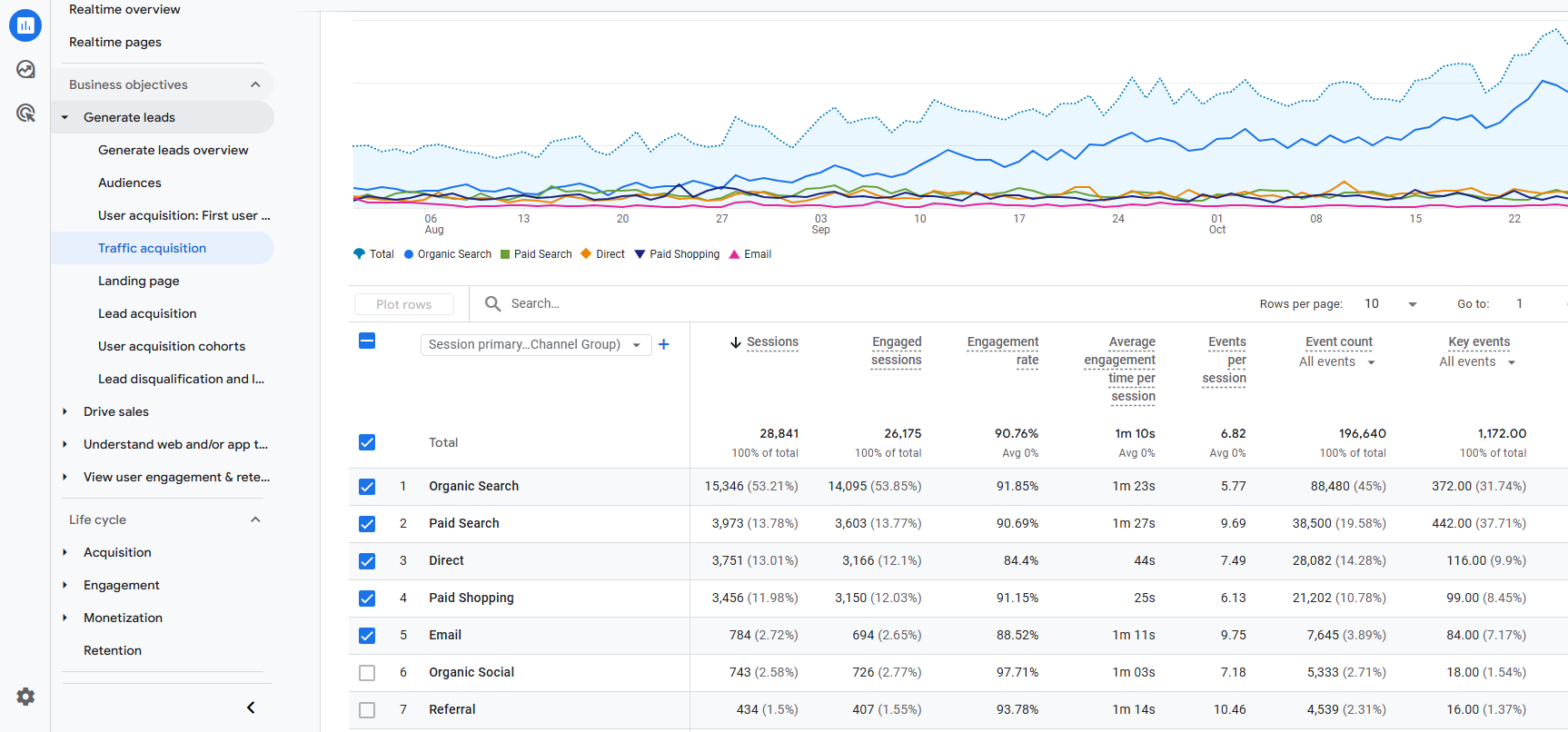
For a comparison of traffic sources, select “Traffic Acquisition” under the “Generate Leads” tab inside “Reports” section. This report will give you a comprehensive view of all traffic sources to your website, including email traffic. This report is only reliable if your email traffic is grouped correctly, with the help of UTMs.
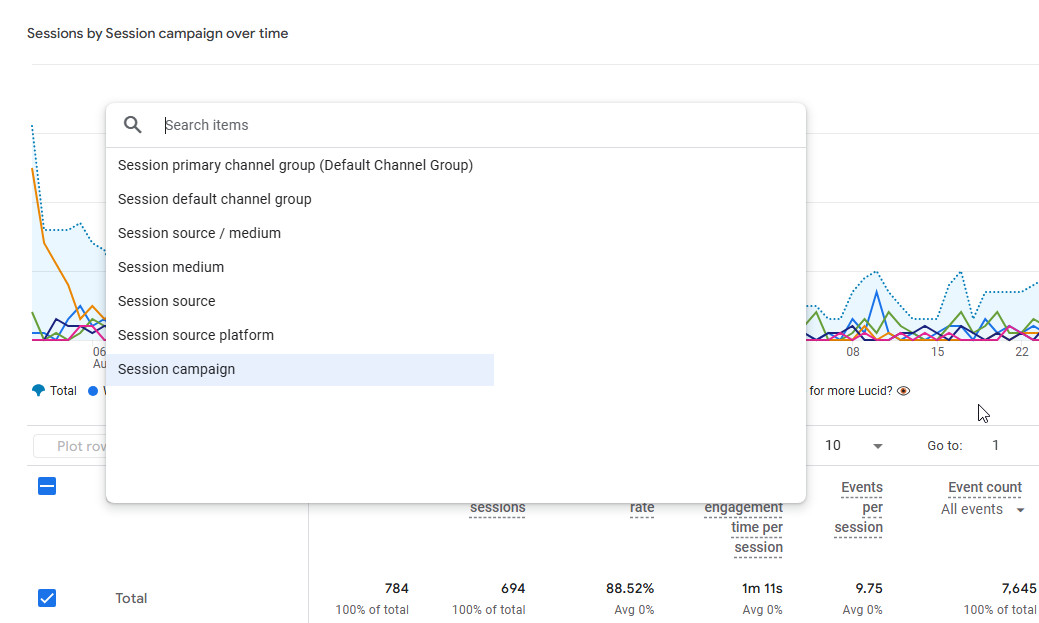
To compare campaigns to each other in the same report, select “Session campaign” as the primary dimension – the drop-down menu below “Plot rows”.
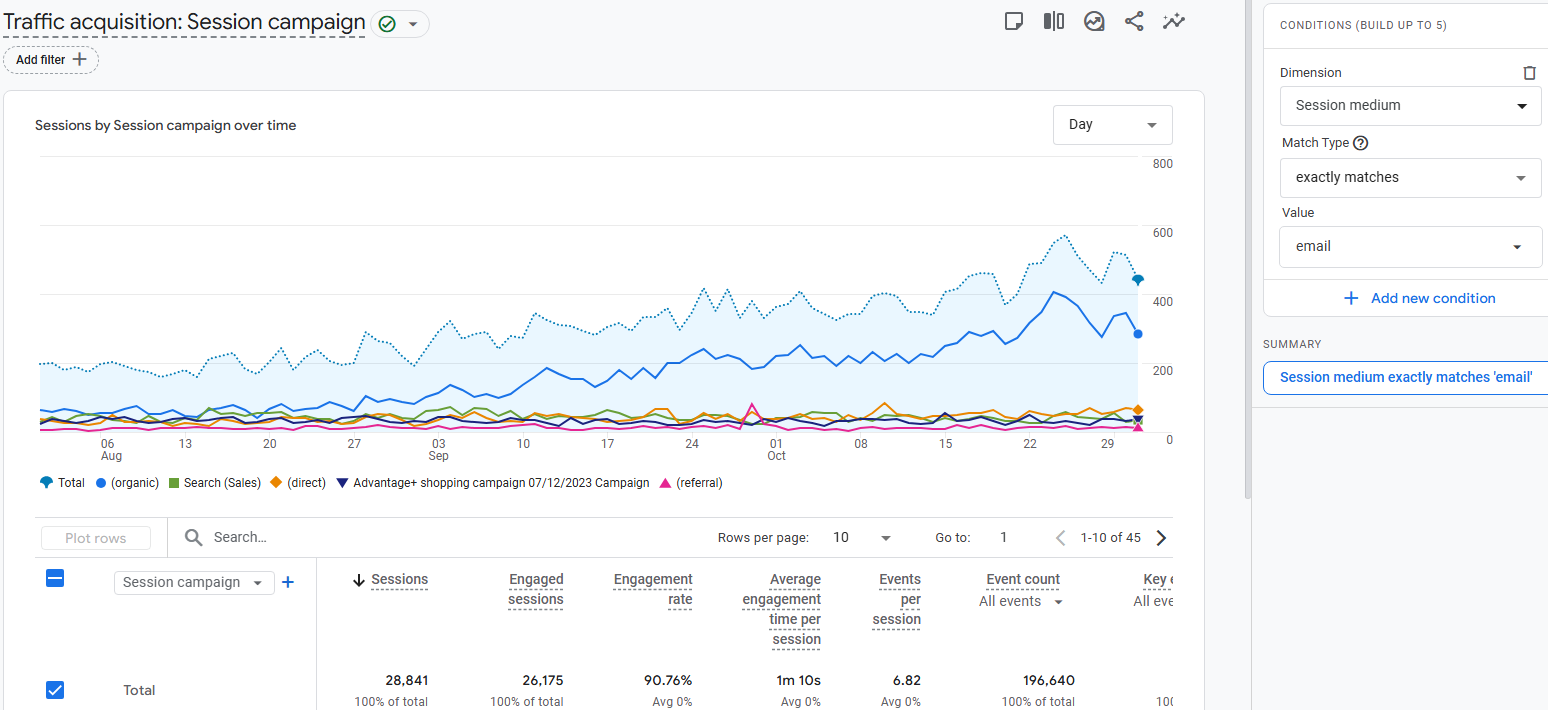
You’ll also need to configure Session medium filter. Click “Add filter” button near the top and select “Session medium” as Dimension, “Exactly matches” Match type and “Email” as Value.
Consistent tagging of your email links is what enables you to compare email campaigns to each other, as well as it enables you to analyze email campaigns on the full context of all campaigns.
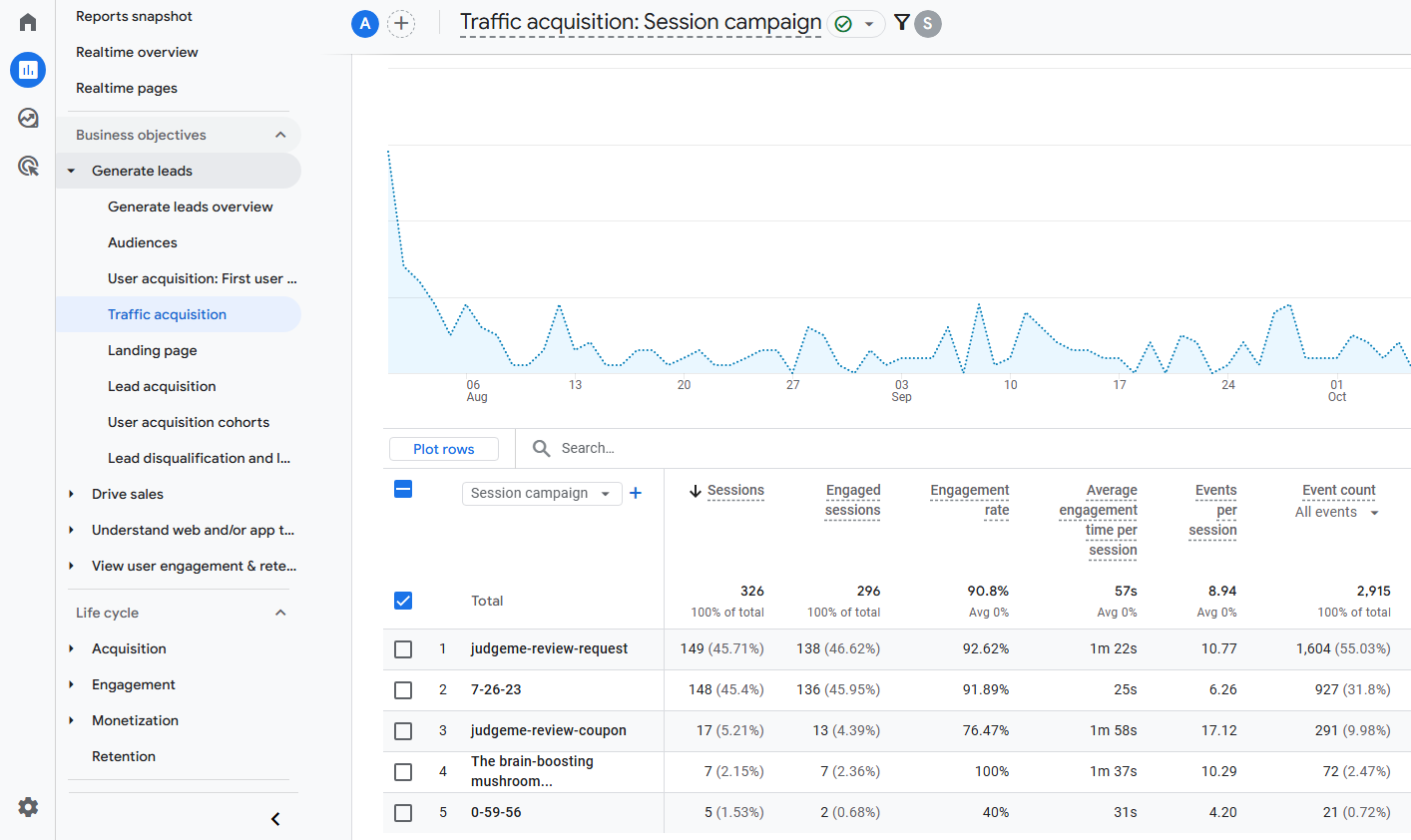
Finally, UTMs help you with nuance that helps you improve individual emails or email flows. Proper attribution of conversions to link clicks gets you as far as relating open and click-through rates to subject line versions or link placements.
Email UTM Tagging Recap & Breakdown: Reasoning behind the Sample Link with UTMs
At the top of this article, we showed an email link with UTMs. Throughout the article, we described best practices that will help you build email UTMs well. Now we’ll explain them on each of the five parameters in the link:
https://web.utm.io/?utm_campaign=july-content-distribution&utm_source=autopilot-blog-subscriber&utm_medium=email&utm_term=the-best-of-personalization&utm_content=bottom-cta
The utm_campaign parameter indicates that the goal was to distribute content in the month of July. This works because you could also use the same campaign name on other channels where you’re distributing the content.
The utm_source parameter indicates that the email was sent from Autopilot, and that it was sent to blog subscribers. Using one or both of these data points is consistent with how traffic from other sources shows up in your reports.
The utm_medium parameter simply indicates email as the channel. This is just how email traffic is already indicated in GA’s Default Channel Group.
The utm_term parameter indicates the subject line used in the email, enticing the recipients to learn about personalization with us. This allows you to analyze how your subject line affects open rates and other metrics.
The utm_content parameter indicates where in the email the link was placed. If used, this enables the nuance you need for testing and optimization.
Level Up Your Campaign Reporting
Now that you’ve read this far, you’ll be able to tag your email links with UTMs that will give you nuanced and insightful reports. To take it all the way, we recommend also watching the webinar on advanced reporting with UTMs in Data Studio.

When choosing the source, should you use the name of your platform such as you have posted in this article; mail chimp or campaign monitor or aweber if that is what you use or should you simply use house_list as other marketers have done? Would love to know your thoughts on this.
Hey Matt, it is best practice to use the platform (for example: mailchimp for email) or website source (for example: facebook) as utm_source. I’ll send you an email and give you some examples of we recommend on our platform.
Would you use the name of the Funnel as the Campaign name when using Marketing Automation or the subject line of the email?
For instance, if I have a funnel that is “Free Mortgage Broker Hiring Guide” and an email that has the subject line: “Please Confirm Your Email” along with other emails such as “Here is Your Free Mortgage Broker Hiring Guide”
Would you recommend using the Funnel Name: “Free Mortgage Broker Hiring Guide” as the campaign name each and every time (for all of the links in the email) or would you instead use the subject line such as “Please confirm your email” and “Here is your free mortgage broker hiring guide” subject line as the campaign name? (or is it just preference?)
To me it makes sense to use the email subject line as the campaign name.
Would love to hear your thoughts on this.
I decided to use the names of the emails (that are in a campaign funnel) as the campaign source so that I could track the performance of each email in the actual campaign. This made most sense to me but thought I would share with you.