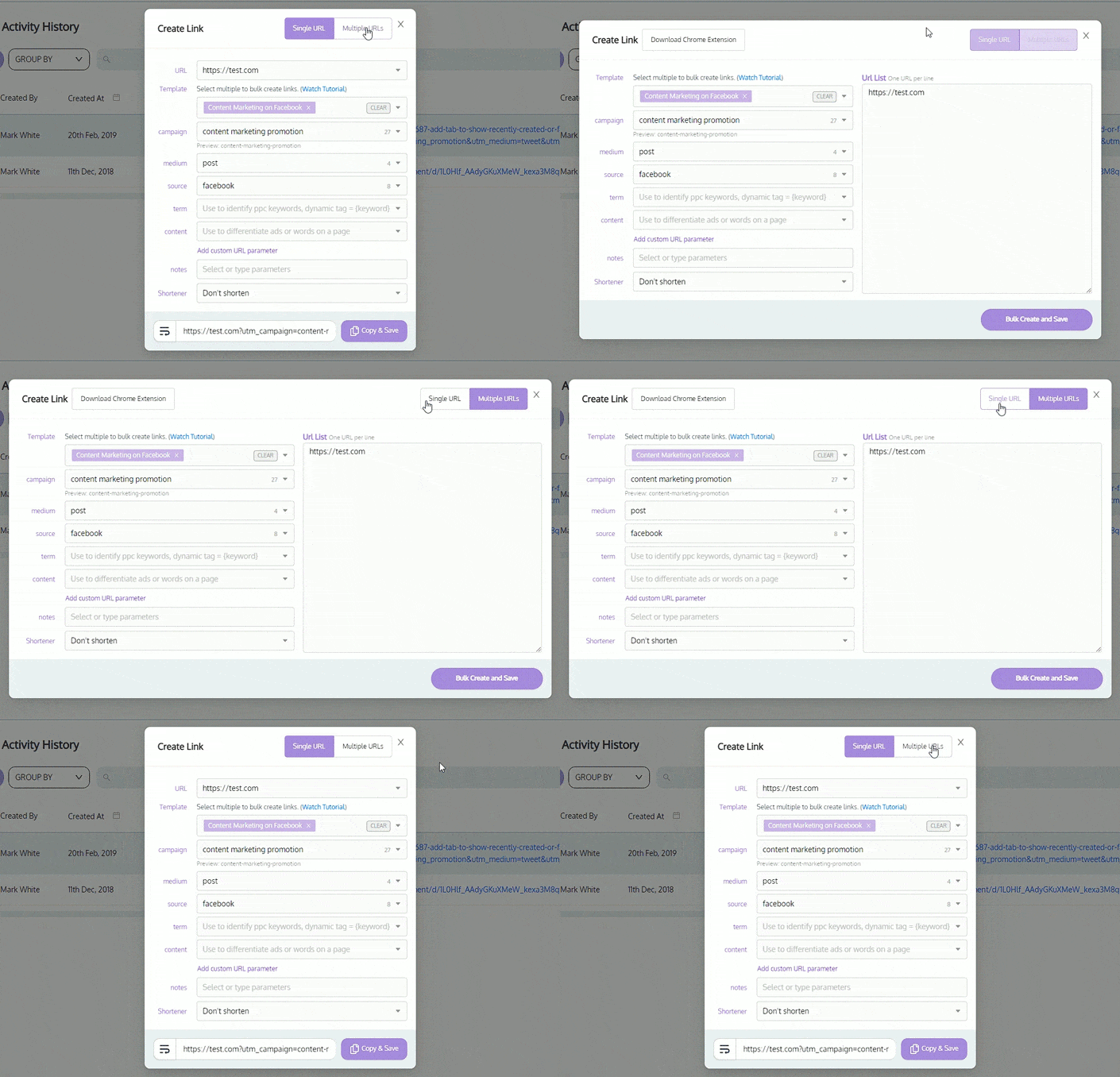
Creating UTM (Urchin Tracking Module) parameters for your website links can be a complex and time-consuming process. But with UTM.io’s Link Builder, it’s never been easier to build and manage your links.
Whether you’re a marketer, analyst, or administrator, the Link Builder streamlines the process of creating and customizing UTM parameters, making it simpler and more efficient to track, analyze and act on the performance of your campaigns.
Core URL Builder Features
Easy UTM Link Building
Building UTM links has never been easier. With the Link Builder, you can specify the source, medium, campaign, term, content, and any other custom parameters for your UTM parameters. This means you can easily create links that are tailored to your specific needs.
➜ Auto-Generated QR Codes with UTMs.
➜ Easy selection of UTM values for each parameter and attribute.
➜ Ability to add additional attribute information to your links.
The bulk UTM link builder streamlines the creation of multiple UTM links, perfect for large campaigns. Add multiple templates, and values, and paste a list of links for generating desired links. Or alternatively, import your links via CSV. Effortlessly save time compared to manual single creation.
➜ Apply multiple UTM templates at once.
➜ Build UTM links for multiple URLs with ease.
➜ Streamline your campaign creation with one step up.
UTM Templates
Creating UTM links can be time-consuming, especially if you’re building the same link over and over again. With the Link Builder, you can save your link setups as templates, making it even easier to build new links. You can also see a preview of your link parameters before generating it, so you can make sure everything is correct.
➜ Supports any UTM taxonomy and UTM conventions.
➜ Streamlines UTM link creation to reduce training and errors.
The Link Builder is also available as a browser extension. This makes it even easier to build and manage your links and reduces the time you spend on this task.
The bulk link builder streamlines the creation of multiple UTM links, perfect for large campaigns. Add multiple templates, and values, and paste a list of links for generating desired links. Effortlessly save time compared to manual single creation.
➜ Manage all UTM values that are displayed in the builder.
➜ Attach UTM rules to each parameter or attribute that dictates what/how values get filled in.
➜ Easily add new values while building new links to be saved for the future.
Choose From a "Pretty Name"
Creating links can be time-consuming, especially if you’re building the same link over and over again. With the Link Builder, you can save your link setups as templates, making it even easier to build new links. You can also see a preview of your link parameters before generating it, so you can make sure everything is correct.
➜ Easily readable name for any member of the team to understand.
➜ Reduce training time on how to setup proper links.
➜ Managed all-in-one-place.
Connected Workspace and Rules
Connected to a workspace, where you can manage your link settings and share information with your team. Ensuring consistency and reducing the risk of errors. User rules can also be set to ensure that the correct parameters are used for each link, making it even easier to build your links the right way.
➜ Enforce lowercase uppercase, spaces, etc
➜ Prohibit characters and symbols.
➜ Require, lock, hide, and validate specific parameters and attributes.
Don't settle for a one-size-fits-all approach to link tracking.
Get a personalized and customizable solution that aligns with your unique business needs.
Unleashing the Power of Data-Driven Marketing through data governance.
UTM.io solves a critical problem faced by many businesses today. The challenge of effectively tracking and analyzing their marketing efforts consistently.