
4. Content Parameter for Placement Differentiation
☐ Use utm_content to differentiate link placements within the same campaign
☐ Tag different CTAs, ad placements, or creative versions with unique content parameter values
☐ Don’t skip this parameter—it adds valuable nuance to campaign reporting
Examples: utm_content=main-feed, utm_content=sidebar-ad, utm_content=header-cta, utm_content=footer-button
Many marketers make the mistake of skipping the content parameter because it’s optional. Instead, they create multiple campaigns with different campaign name values, which makes it harder to get granular insights for a single marketing campaign.
The content parameter is essential for A/B testing different creative versions and understanding which placements are driving traffic most effectively.
5. Term Parameter for Keywords and Copy Testing
☐ Use utm_term for paid search keywords in your Google Ads campaigns
☐ Extend usage to track email subject lines or ad headlines in the term parameter
☐ Apply this parameter for A/B testing copy variations across campaigns
Examples: utm_term=black_boots_sale, utm_term=win-free-trip-subject-line
The term parameter originated in Google Ads for tracking search keywords, but digital marketing professionals use UTMs broadly to track which phrases or headlines resonate with audiences.
This metric helps optimize ad spend allocation and identify winning copy. You can use Google Analytics to analyze which terms drive the most valuable website traffic.
6. Custom Campaign Parameters for Special Attributes
☐ Add custom parameters when standard UTM parameter options don’t meet your needs
☐ Use custom parameters for attributes you report on frequently
☐ Examples include: &geo=chicago, &affiliate=partner-name, &agency=agency-name
Custom campaign parameters allow marketers to differentiate campaigns without overloading the five standard parameters.
They work best when you need to track attributes like geographic targeting, affiliate partners, agency collaborations, or sub-brands. Note that GA4 does not automatically register custom query parameters and you may need to configure your GA4 to capture custom parameters.
UTM Naming Conventions and Governance Systems
7. Establish Clear Naming Conventions
☐ Document your naming convention in a shared location accessible to all team members
☐ Define exact values for each UTM parameter type
☐ Ensure all team members follow the same consistent rules
☐ Use a tool like UTM.io to enforce naming conventions automatically
A naming convention is your single authoritative source for how to create UTM codes. Without it, team members might use “fb” versus “facebook,” creating fragmented data in your analytics.
Your naming convention should specify exact formats for source and medium values, campaign naming patterns, and content descriptors. This prevents inconsistencies that undermine your analytics and ensures everyone on your team can contribute to accurate UTM data collection.
8. Align with GA4 Default Channel Groupings
☐ Review Google Analytics’ default channel definitions before creating UTM parameters
☐ Match your medium parameter values to GA4 channel groups for consistency
☐ Use established patterns rather than reinventing the wheel for your campaign tracking
When your UTM parameter values match GA4’s default channels, you can easily compare campaign data with organic traffic data within your analytics platform.
GA4 automatically categorizes traffic based on session source and medium values, so alignment ensures accurate reporting in your analytics tools. This best practice helps you use Google Analytics more effectively for cross-channel analysis.
9. Document Link Creation and Ownership
☐ Record who created each UTM link for accountability
☐ Track when URLs were created and for which campaigns
☐ Use a builder that auto-populates creator information
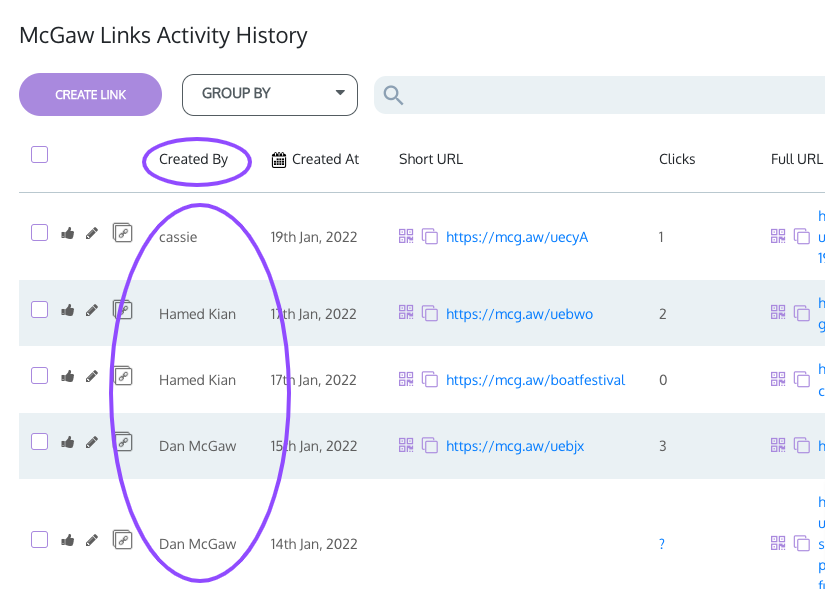
When questions arise about UTM data, knowing who built the URL helps resolve issues quickly. A URL builder tool can automate this tracking, while spreadsheets require manual work to maintain records. Consider using a template for recurring campaign types to streamline your UTM process and reduce errors.
10. Use a Dedicated URL Builder Tool
☐ Choose a URL builder that enforces your naming conventions
☐ Use Google’s Campaign URL Builder for basic needs
☐ Consider a third-party tool like UTM.io for team collaboration
☐ Save builder configurations for repeated campaign types
Manually creating UTMs with a spreadsheet gets messy over time and leads to inconsistencies. A dedicated UTM builder allows you to create UTM codes quickly while maintaining standards.
The Campaign URL Builder from Google is free, but advanced teams benefit from builders that offer saving, team permissions, and validation rules. A tool like this eliminates guesswork and ensures your UTM strategy remains consistent across all campaigns.
When to Use UTM Parameters (and When to Skip Them)
11. Always Tag Email and Social Campaigns
☐ Add UTM parameters to all email campaign URLs without exception
☐ Tag all paid and organic social media platform links with appropriate UTM parameters
☐ Use UTM codes you create rather than relying on platform auto-tagging
Email and social are the marketing channels most often miscategorized as “Other” or “Referral” in analytics. Always include UTM codes in these channels.
Use UTMs you create rather than relying on auto-generated tags from email platforms, as auto-generated UTM parameters may not follow your naming convention. This ensures you can accurately track the performance of each channel.
12. Don’t Use UTMs on Natural Referrers
☐ Don’t tag organic search traffic with UTM parameters
☐ Don’t use UTM parameters on links shared organically by users
☐ Don’t attempt to tag social posts made by the public
UTMs are not designed for traffic you don’t control. Organic search, user-shared links, and public social mentions cannot be tagged consistently. Attempting to do so results in incomplete, unverifiable data that clutters your analytics reports. Focus your UTM tracking efforts on channels where you control the links.
13. Do Tag Referrers You Control
☐ Add UTM tracking to business directory listings you manage
☐ Tag affiliate partner links with appropriate UTM parameters
☐ Add UTM parameters to any referral URL you place yourself
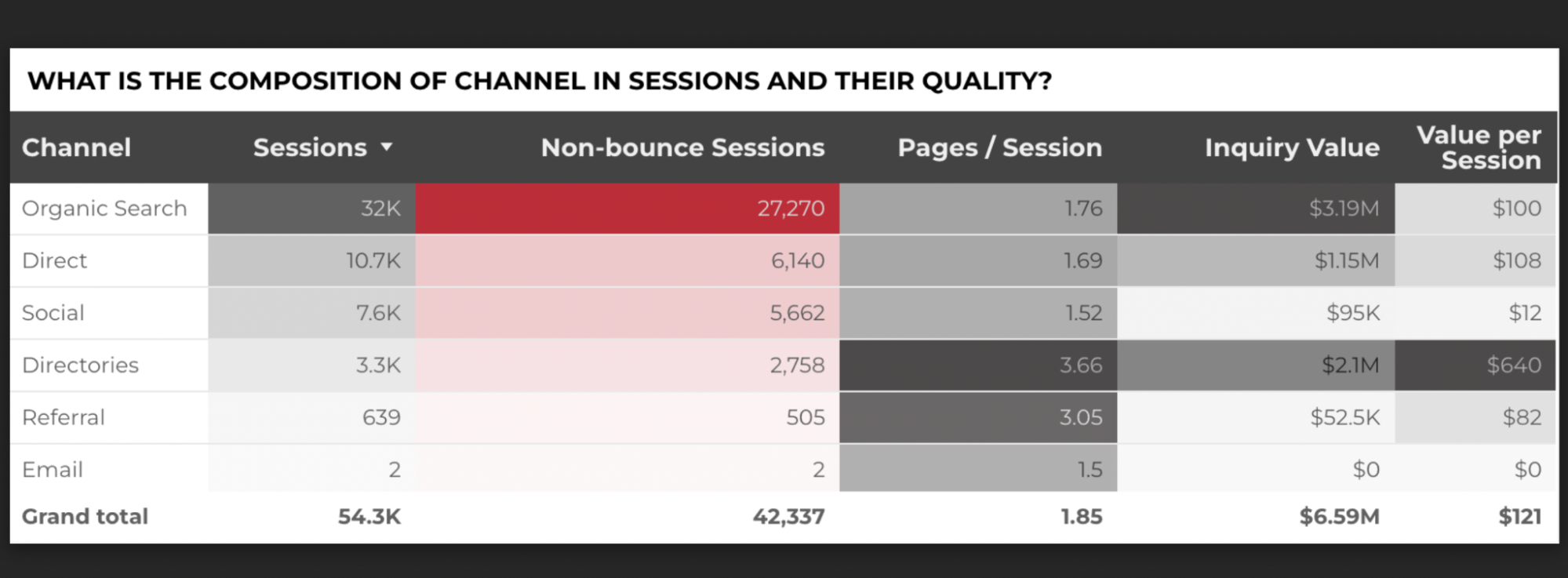 Channel reports with directory listings
Local directory listings on Google Business Profile or Yelp are valuable lead sources. Since you control these URLs, you can add UTM parameters to your URLs to differentiate directory traffic from other referrals. These parameters help you understand which listings drive the most valuable traffic acquisition and inform your online marketing decisions.
14. Never Tag Internal Links
☐ Don’t apply UTM parameters to internal links within your website
☐ Understand that UTMs on internal links can overwrite traffic source attribution
☐ Keep UTMs exclusively for external traffic sources
In GA4, UTMs added to internal links do not automatically start a new session by default. The real risk is attribution override: new UTM parameters can replace the original source/medium and campaign values mid‑visit.
This skews session metrics, bounce rates, and conversion reporting, and makes it difficult to accurately understand how users originally found your site.
15. Use UTM Parameters with Google Ads (Hybrid Tagging)
☐ Keep auto-tagging (GCLID) enabled as it drives Google Ads attribution and cost reporting in GA4
☐ Enable hybrid tagging if you use Google Analytics alongside other analytics tools
☐ Use UTMs for cross-platform consistency and access them via manual dimensions (session source manual, session medium manual, session campaign manual)
Google Ads auto-tagging (GCLID) handles attribution and cost reporting in GA4, and UTM parameters will not override this. However, UTMs remain valuable for cross-channel consistency and are accessible in GA4 Explorations, BigQuery, and downstream reporting tools.
16. Implement a UTM Cleaner Script
☐ Add a cleaner script that removes UTMs from browser URLs after page load
☐ Ensure analytics still captures the UTM data before removal
☐ Prevent users from sharing tagged URLs in organic contexts
When users copy URLs with UTM codes and share them via messaging apps or email, the UTM code travels with the link. This leads to incorrect attribution – someone clicking a link shared on WhatsApp might be recorded as coming from a paid social ad campaign.
A cleaner script removes UTMs from the browser address bar after tracking fires, preventing this issue while maintaining accurate UTM data in your reports.
UTM Formatting Rules for Clean Analytics Data
17. Use Dashes Instead of Spaces
☐ Replace spaces with dashes in all UTM parameter values
☐ Use underscores only to connect words meant to read as one unit
☐ Avoid plus signs and special characters in your UTM parameters
Spaces auto-convert to “+” in URLs, creating messy links and inconsistent data. Use dashes to separate words (spring-sale) and underscores when two words should read as one concept (best_practice). This formatting best practice ensures your URLs remain clean and readable.
18. Enforce Lowercase in All Parameters
☐ Use lowercase letters exclusively in all UTM parameter values
☐ Remember that UTM codes are case-sensitive and treat uppercase differently
☐ Configure your builder tool to auto-convert to lowercase
Because UTM codes are case-sensitive, “Facebook” and “facebook” appear as different sources in GA4 reports. Here’s an example of unreadable uppercase tagging:
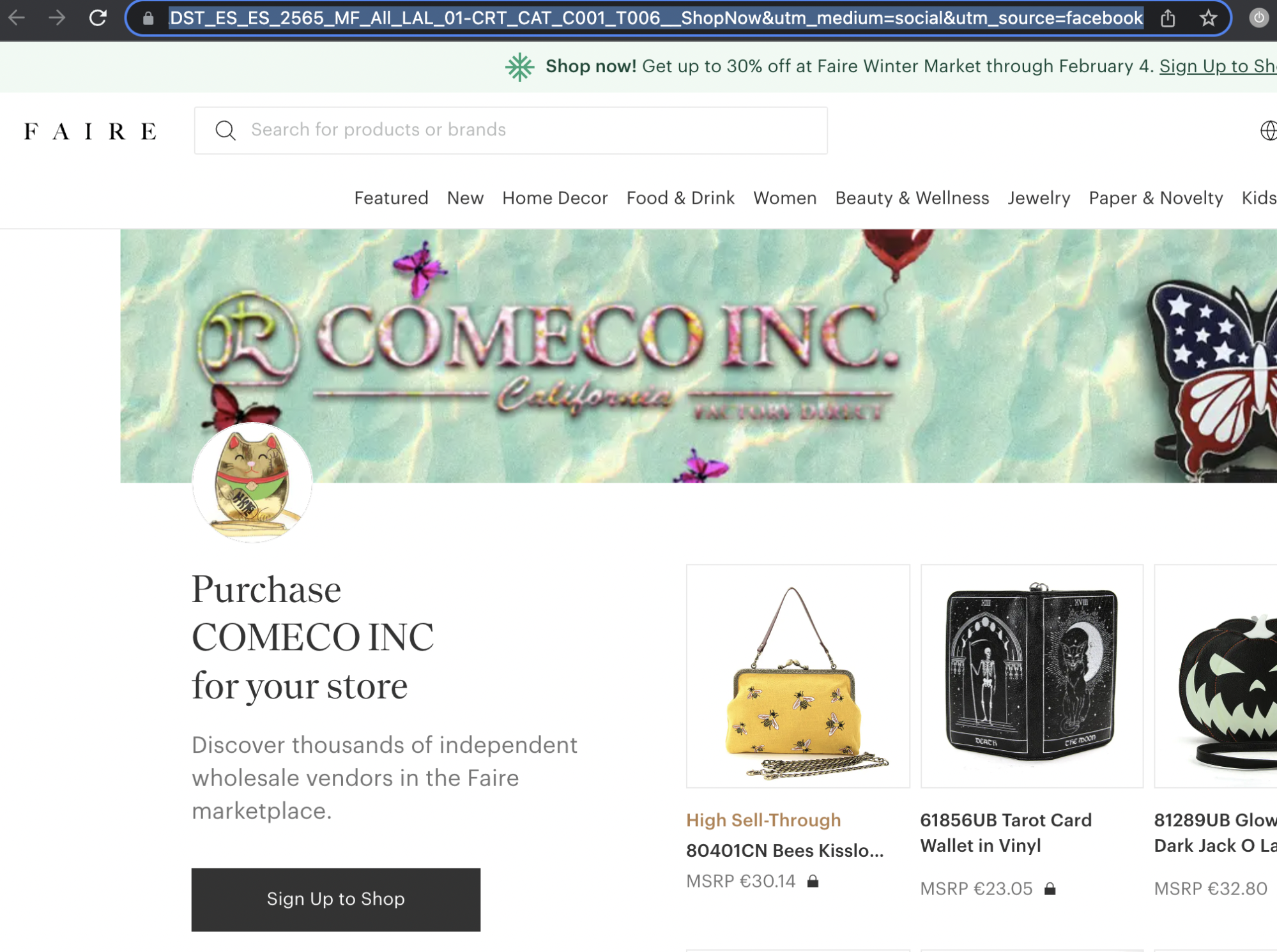 Faire’s Facebook Ad
This fragments your data and makes analysis harder. Using lowercase throughout eliminates this problem and makes URLs easier to read. The effectiveness of your UTM implementation depends on this consistency.
19. Avoid Redundancy Across Parameters
☐ Don’t repeat information across different UTM parameters
☐ If source says “facebook,” don’t include “facebook” in medium or campaign
☐ Use each parameter for unique, non-overlapping information
Each UTM parameter should add new information. Repeating “facebook” in multiple parameters wastes space and doesn’t add analytical value. Use each parameter to capture a distinct dimension of your campaign effort and maximize the insights you can derive from your UTM data.
20. Prioritize Readability
☐ Create UTM links that can be summarized in one sentence
☐ Keep UTM parameter values short and descriptive
☐ Test readability by reading the URL aloud
A good UTM link tells a story.
For example: ?utm_source=facebook&utm_medium=social&utm_campaign=mothers-day-giveaway-2026&utm_content=win-free-trip-cta translates to “A Facebook user clicked our Mother’s Day giveaway campaign via the win-free-trip CTA.”
If you can’t easily summarize your UTM link, simplify it. This allows you to track campaign performance while maintaining clarity.
21. Shorten Long URLs
☐ Use a link shortener for user-facing URLs
☐ Consider branded short domains for better trust
☐ Maintain full UTM tracking even with shortened links
Long URLs with visible UTM codes can deter clicks—users may worry about malware or tracking. A link shortener or a custom branded domain shortener creates clean, trustworthy URLs while preserving all UTM data for analytics.
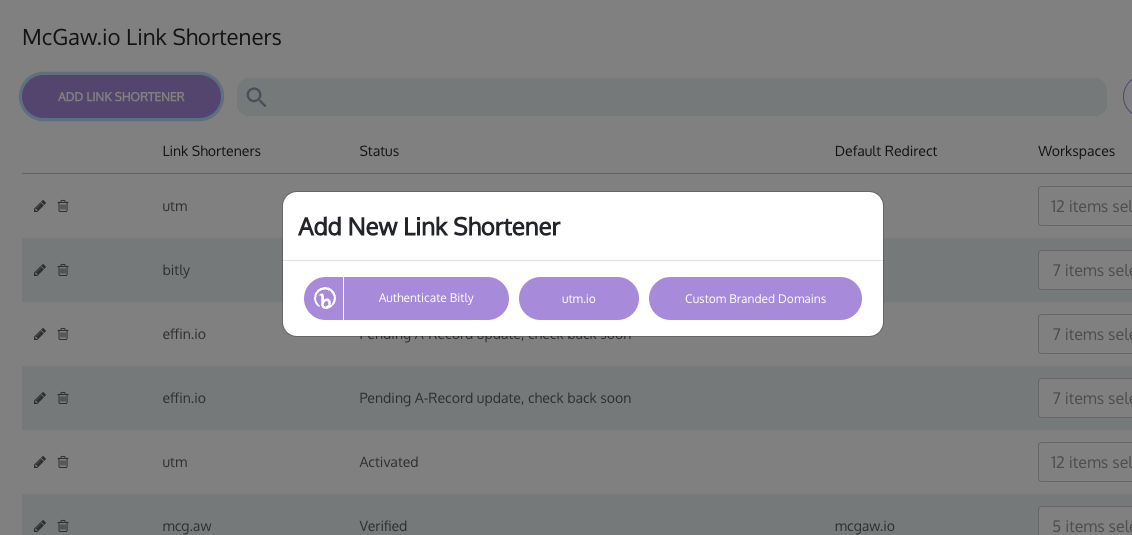 Configuring Custom Branded Domains (UTM.io tool)
This improves click-through rates while maintaining full tracking capabilities across all your marketing efforts.

Very informative
Nice