
After creating dozens of attribution models for clients, we’ve seen first-hand how organizations limit their analytical capacity by neglecting the full potential of UTM naming conventions.
Maybe you already use them somewhat effectively, but wonder if there aren’t better naming conventions out there, conventions that would help you report on the ROI more easily, with greater depth, and across every metric that matters. Or, maybe the main issue is a vast stockpile of tagged links that’s far too cumbersome to organize.
Either way, the best means of addressing these analytical roadblocks are advanced naming conventions, which greatly expand the range of variables you can track while simultaneously simplifying your reporting workflow.
UTM Basics: The 5 Core Parameters
Before diving into advanced conventions, let’s refresh the fundamentals. UTM stands for Urchin Tracking Module – named after Urchin Analytics, the software Google acquired to create Google Analytics.
UTM parameters are key-value pairs you append to any URL to track where clicks originate and how visitors interact with your marketing channels.
There are five standard UTM parameters, each serving a distinct purpose:
| Parameter | Purpose | Example |
|---|---|---|
| utm_source | Identifies the traffic source or referral origin | google, facebook, newsletter |
| utm_medium | Specifies the campaign medium or channel type | cpc, email, social, PPC |
| utm_campaign | Names the specific campaign name or promotion | summer_sale, product_launch |
| utm_term | Captures the keyword for paid search campaigns | running_shoes |
| utm_content | Differentiates similar content or links within the same ad | cta_button, header_link |
The first three parameters (source, medium, and UTM_campaign) are essential for proper UTM tracking, while term and content are optional but valuable for granular analysis.
When a visitor clicks a link with UTMs, your analytics platform reads these UTM values and attributes the session accordingly. This is the most reliable way to track cross-channel performance without relying solely on automatic detection, which can be error-prone for certain traffic sources.
Which Marketers See Value from Advanced UTM Conventions?
Marketers who benefit most from UTMs typically run large campaigns and run them often. But there’s more to it. Advanced naming conventions are most useful for marketing professionals who share at least a few of the following circumstances:
- Runs campaigns that generate volumes of data rapidly
- Has a significant portion of budget assigned to each campaign variation
- Runs AB testing
- Tailors campaigns per region
- Uses analytics tools as part of a broader automation stack
- Has the ability to optimize or grow campaigns based on nuances in data
- Is interested in establishing a consistent workflow in naming UTMs
- Likes to automate processes with a URL builder tool such as UTM.io
- Works with a team
- Manages eCommerce, SaaS, or lead-generation funnels where every click matters
Let us stop on the last point. Campaigns run by a team of marketers are a chief use case for advanced UTM conventions. It is only when your conventions are dialed in that the whole team can understand them, use them correctly and consistently. That makes granular performance reporting easy.
Working on complex campaigns alone, as rare as it is, is also a great case for advanced UTM conventions. From a campaign management perspective, complex campaigns run similarly to campaigns run by a roomful of people.
Advanced naming conventions aren’t as useful for companies that run small, and simple campaigns, or one whose traffic does not yet merit granular optimization.
So, if you’re a marketing professional who runs large campaigns, a high volume of campaigns, read on.
What a UTM Naming Convention Is
UTM naming conventions are how you combine and structure individual UTM parameters to create a single code. So, if you always use “paid-social” in your medium parameter for paid social campaigns, the “paid-social” is a part of your convention.
There’s no “correct” structure, as they should be customized to the particulars of your marketing goals and infrastructure. A marketer could instead choose “social-cps”, or “social-ads.”
Alternatively, your convention may be that the campaign parameter must be named the same across all channels whenever it helps the same promotion.
So if you’re, say, promoting the launch of your new tool, you’ll use “product-launch” on paid social, as well as on the newsletter, organic social, affiliate, or anything else you run.
The full convention for the product launch campaign promoted via paid social could then look like this:
- Campaign: Use a cross-channel description of what we’re promoting: “product-launch”
- Medium: Always use the following exactly: “paid-social”
- Source: Always use the name of the social network: “facebook”
But What’s an Advanced UTM Naming Convention?
You’re probably wondering what makes a UTM convention “advanced.” In short, advanced naming conventions are those that utilize a more complex structure as a means of packing in more trackable variables for each parameter. We particularly focus on making use of a more complex structure in the campaign parameter.
Naming conventions are advanced when they make use of intentional structure in the UTM parameters — most often the campaign parameter
In the example of paid social campaigns above, we could enrich the campaign parameter “product-launch” with more useful information. When reporting, we’ll get useful insight from, e.g.:
- Country: When there are different campaigns in different countries
- Month and Year of Launch: When product iterations get launched multiple times a year
- Target: When the product has multiple target audiences
We’ll use underscores for words that belong into each sub-parameter, and hyphenate the whole convention together. The order of the sub-parameters will be key, as you’ll see below. The whole campaign parameter would look like this:
?utm_campaign=product_launch-US-October_2025-crypto_invest
Assuming that you have more context, this tells you that the campaign is for a product launch, in the US specifically and not the other markets that the product is used in.
What’s more, it details that the campaign will occur in October 2025 (Even if the launch is before or after that), and targets the audience of crypto investors instead of the product’s usual audience of NFT creators.
The Importance of Campaign Parameters
The answer is simple. The campaign parameter has the best out-of-the-box reporting in analytics tools, advertising platforms, and CRMs. The platforms usually show a wealth of break-downs for the campaign parameter, and they also often default to reporting on the campaign parameter first.
What Happens if I Mistakenly Mislabel Parameters?
Unfortunately, mistakes in UTM parameters are permanent, which is why consistency in naming is so important. A single misplaced character can ruin valuable data. It’s only when you’re consistent about your use of UTMs that you get their full reporting value.
It’s not possible to catch 100 percent of typos—we’re human after all—so you’ll need a campaign URL builder to automate UTM generation.
Spoiler – UTM.io is that tool: https://utm.io. To get you started, we also have a page with a free UTM generator.
Are Custom UTM Parameters Better Than Advanced UTM Conventions?
While it’s possible to create brand-new parameters for just about any variable under the sun, doing so actually increases the complexity of your reporting, making insights harder to find.
Do keep using custom UTM parameters such as utm_affiliate or utm_agency when you want to dig into reports for just that parameter. But use an advanced naming convention in the campaign parameter instead when you want to instantly compare the different sub-parameters of each campaign.
UTM Naming Convention Models: Which Fits Your Team?
When structuring your UTM conventions, you’ll generally choose from three established models. Each has distinct advantages depending on your organization’s size, technical sophistication, and reporting needs.
Understanding these models helps you select the right approach before you use UTM parameters at scale.
| Model | Pros | Cons | Best For |
|---|---|---|---|
| Cryptic | Secure, short URLs, prevents competitor snooping | Unreadable without lookup table, requires database | Enterprises, agencies with proprietary data |
| Positional | Human-readable, easy to start | Rigid order, breaks if positions change | Small teams, simple campaigns |
| Key-Value | Flexible, scalable, self-documenting | Longer URLs, requires discipline | Multi-channel operations |
Cryptic Model
The cryptic model uses IDs or codes that require a lookup table to decode. For example, UTM campaign name might appear as “C4521” instead of “summer_sale.” While this keeps URLs short and obscures strategy from competitors, it demands an analytics system with a reference database to make UTM data readable for reporting.
Positional Model
The positional model places information in a fixed order within each parameter. A typical structure might be: region_date_channel_offer resulting in campaign names like “us_20240115_email_discount20.” This approach is readable and intuitive but becomes rigid—adding a new variable means restructuring every existing campaign name.
Key-Value Model
The key-value model embeds descriptive pairs directly, such as la-en!t-shopping!c-retargeting. This format is highly flexible and scalable across marketing channels, allowing you to aggregate data by any dimension. The tradeoff is longer URLs, though URL shorteners can mitigate this.
Which Model Should You Choose?
For most marketing teams managing complex, multi-channel campaigns, we recommend a hybrid approach: use the positional model as your foundation for the campaign name, with key-value extensions when you need additional dimensions. This balances readability with flexibility.
Regardless of which model you select, document your conventions thoroughly. When everyone on your team follows the same best practices, your UTM data becomes a powerful asset rather than a chaotic mess.
Use Cases of Advanced UTM Conventions
Let’s get hands-on with these advanced UTM conventions.
First, we’ll walk through the profile of the marketing professionals that get value out of advanced conventions, then show a few examples of UTMs that went from good to great with the help of advanced conventions.
Use Case #1 — Summer Savings Email Campaign
Let’s compare effective-but-basic parameters with their more advanced counterparts. In this example. We’re looking at a B2C email marketing campaign by TaskRabbit, a company that helps you find assistants.
Here’s a UTM from their summer savings campaign:
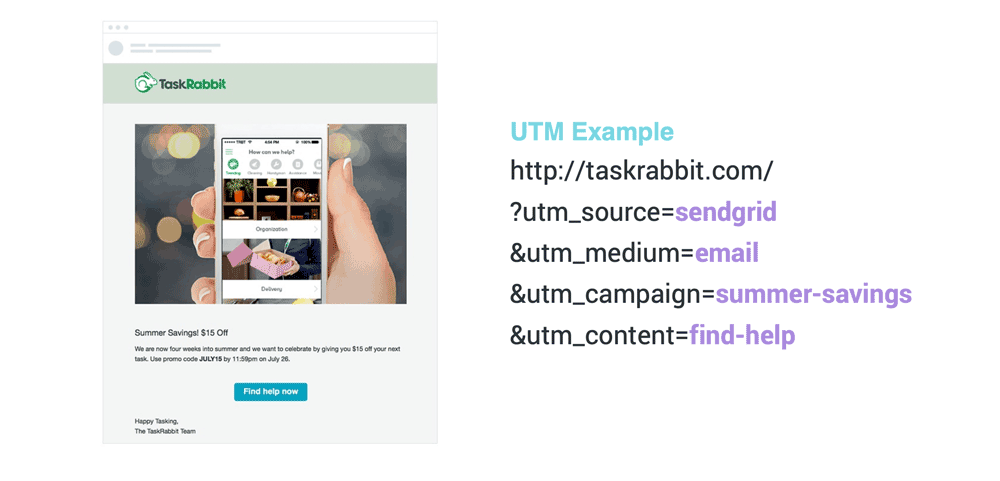
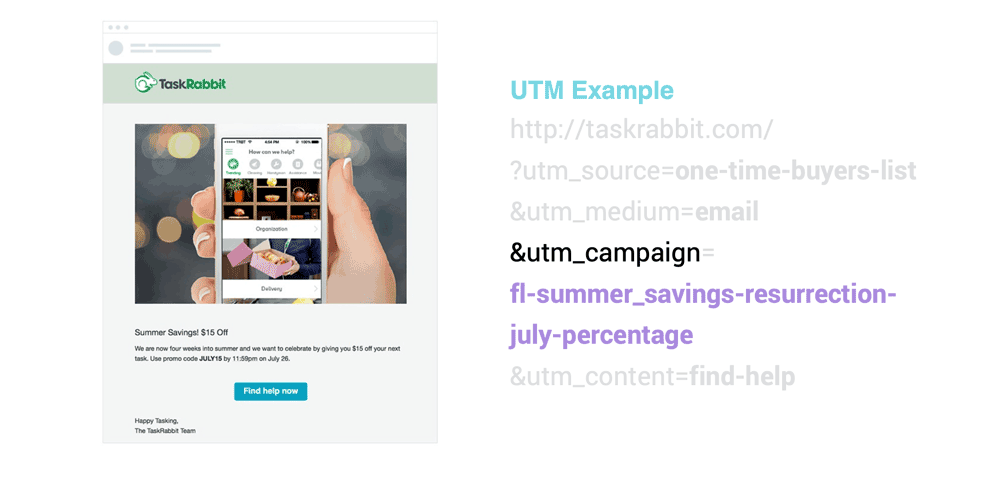
When you compare, the differences become apparent. The first lists its source as “sendgrid,” which refers to the utilized email platform. In the second, the source instead reads “one-time-buyers-list,” referring to the specific email list this campaign was sent to.
TaskRabbit likely only uses one platform to send out emails, so using the source parameter for determining the platform is not valuable data. But determining which of the many lists the email was sent to can lead to actionable insights.
The second difference lies in the campaign parameter, and the advanced use of this one packs a punch. The lower image shows the advanced use of naming conventions. It added a ton of actionable insight—region, month, and promotion type (percentage sale). Now all this additional information can show in easily accessible campaign reporting, as you’ll see below.
Use Case #2 — Google Ads Campaign with Affiliates
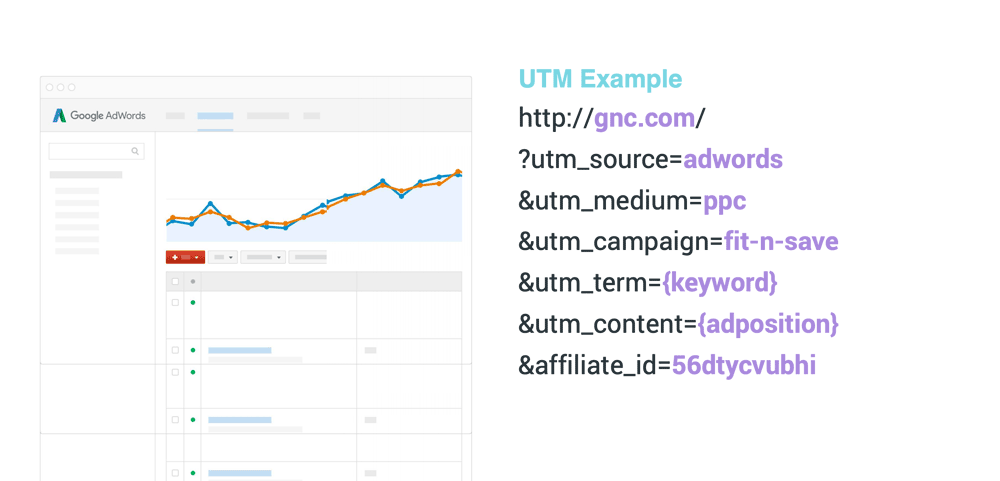
If you’ve been following along you should be able to spot what’s going on in this GNC campaign:
And the advanced convention.
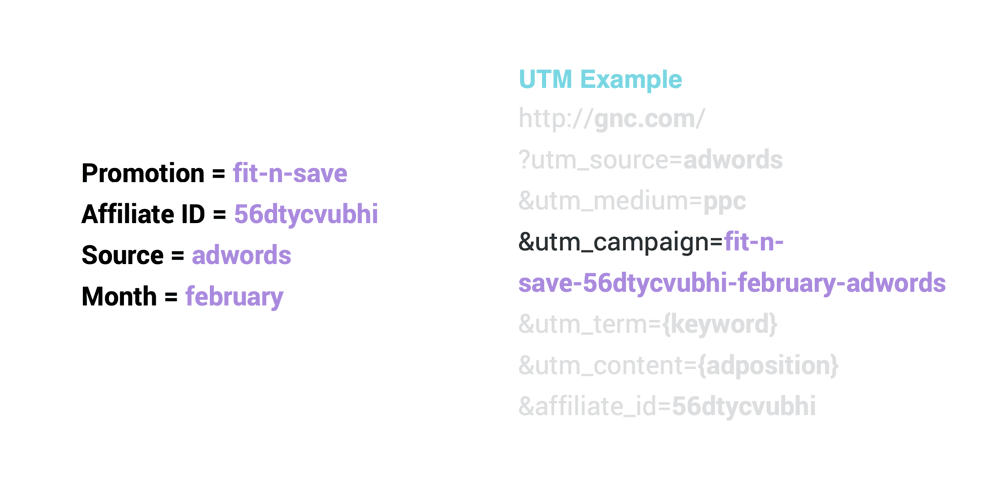
The advanced convention in the campaign parameter both simplifies and enriches the UTM parameters.
Instead of using a custom parameter for “affiliate,” we put the affiliate ID into the campaign parameter. And as opposed to only listing “fit-n-save”, we add three more pieces of data.
This particular mix of variables was selected because they provide the most relevant actionable data for our reporting.
Now all four data points will be easier to find in campaign-level reporting.
Easier to find means easier to optimize.
Use Case #3 — Filtering in Ad Reports
In this instance, we’re using advanced naming rules to make the data more granular—on top of making reporting easier.
Here’s an example of how the reporting part changes.
The two examples below are from Google Ads data that you can see in Google Analytics campaign reports. Advanced naming would give you the same perks in Google Analytics as well and in most other analytics or ad platform reporting.
That’s because most analytics tools work with UTMs out of the box. So you could also reap the benefits in platforms for user analytics, data warehouses, CRM, or data visualization.
Examples would include Amplitude, Pardot, DOMO, Salesforce, Tableau, and many others.
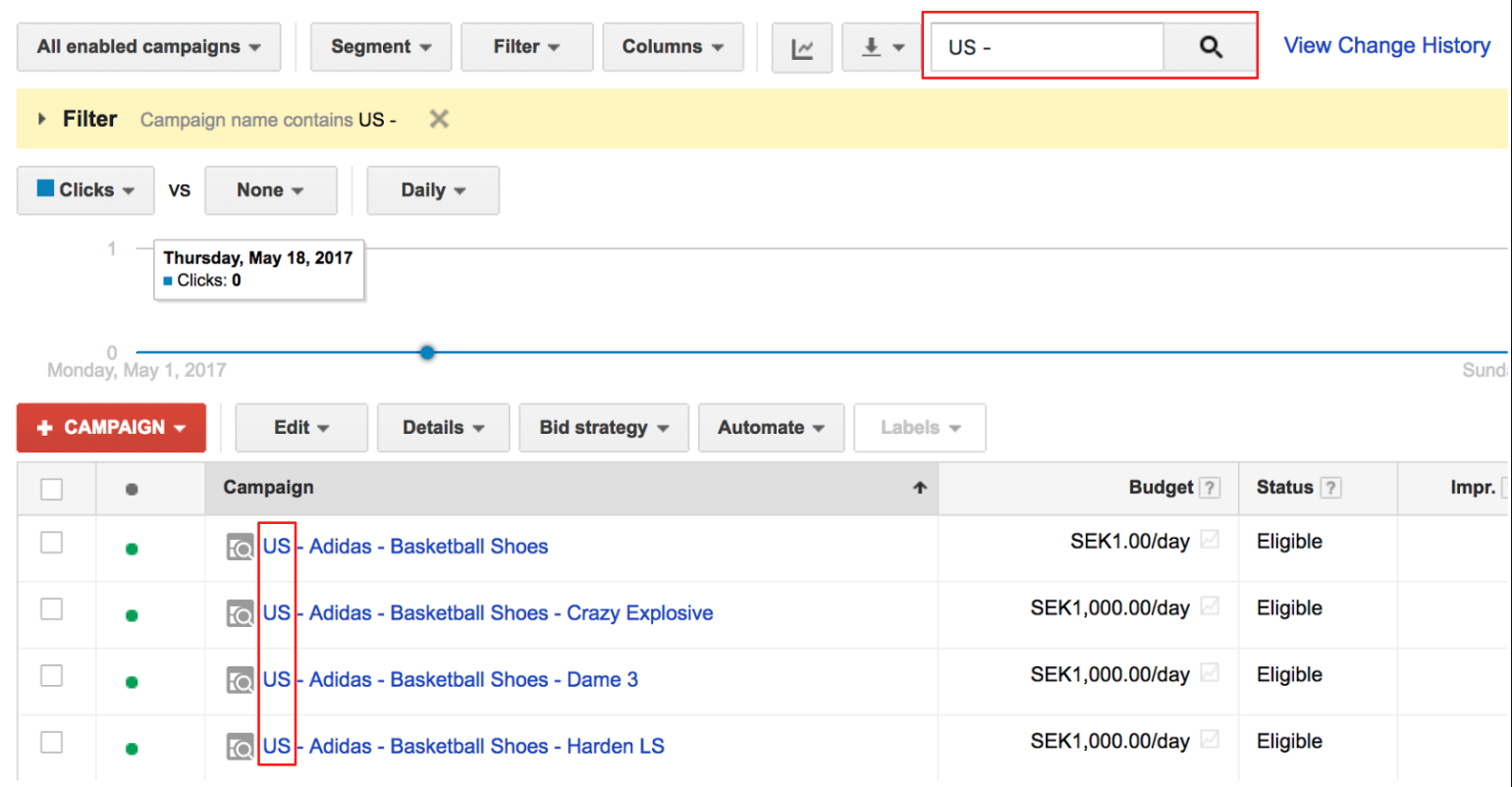
Reporting Sample #1:
Reporting Sample #2:
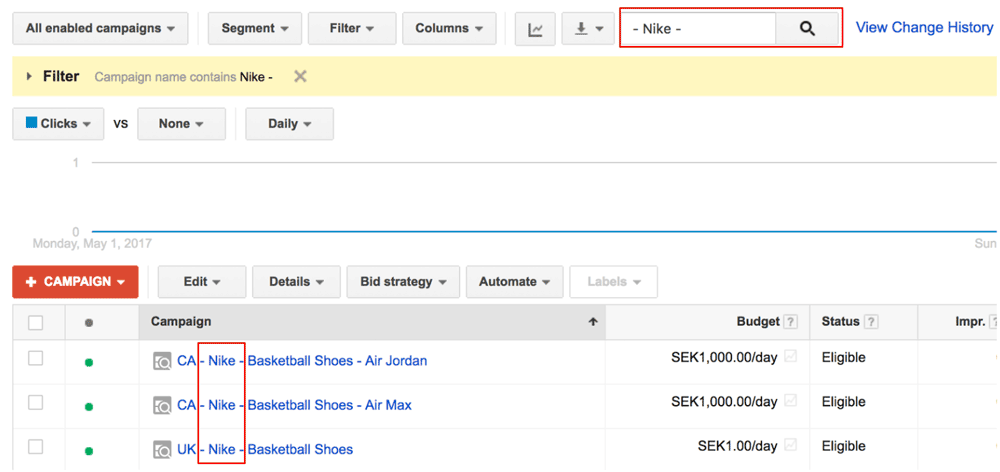
Both samples are for a shoe store, and both use an advanced UTM naming convention that puts the following information into the campaign parameter:
- Region
- Brand
- Shoe type
- Shoe model
In sample #1, we used the basic filtering feature to show only ads that ran in the US. This takes two seconds to get to and the analyst doesn’t even need to switch between reports.
In sample #2, we took two seconds to filter down to just the campaigns that promoted shoes made by Nike. This too was enabled by the campaigns’ consistent use of advanced UTM conventions.
You could also use the convention to establish that you want to be able to report information such as margin size, ad type, URL performance, or anything else relevant.
Make using advanced UTM naming conventions easy for yourself and your team.
4 Benefits of Using Advanced UTM Naming Conventions
Your team and marketing have a lot to gain.
- Easier reporting: Rich campaign parameters make it easier to surface the data you care about. This means you’ll optimize your campaigns more often.
- Increased consistency: Having a convention that your team follows means that the team will be much more consistent about how UTMs are built. This also means the data will be more accurate.
- Faster workflow: Established convention will make it easy for even a new team member to work fast when adding UTM parameters to links.
- More scale: You’ll be able to grow your campaigns faster thanks to the combination of higher confidence in the data and the increased ease of taking action.
UTM.io – The All-in-One Tool for Advanced UTM Naming Conventions
UTM.io is built by advanced marketers for advanced marketers. We also have a simple UTM builder page for the masses, but the dedicated tool makes UTM conventions easy to use for team members, and easy to set for team leaders. Without both, your conventions will neither be consistent nor consistently enforced. Spreadsheets don’t cut it.
Specifically, the tool helps you:
- Improve data accuracy with prebuilt UTM conventions and templates
- Make adoption of UTMs easy for your team
- Enforce the use of specific conventions with dynamic variables
- Enhance your reporting with custom parameters
- Make advanced use of UTMs easy for your team
You’ll even love the workflow. Your team members insert a link, select a template with the conventions included, and the detailed rules you create force them to fill out parameter fields just right.
Perks such as dynamic parameters automate the process, and conventions that culminate your campaign tracking taxonomy are built into the tool as well.
Campaign data will be way easier to report on. Check out the workflow in the following example of a link building screen, with templates and drop-downs:
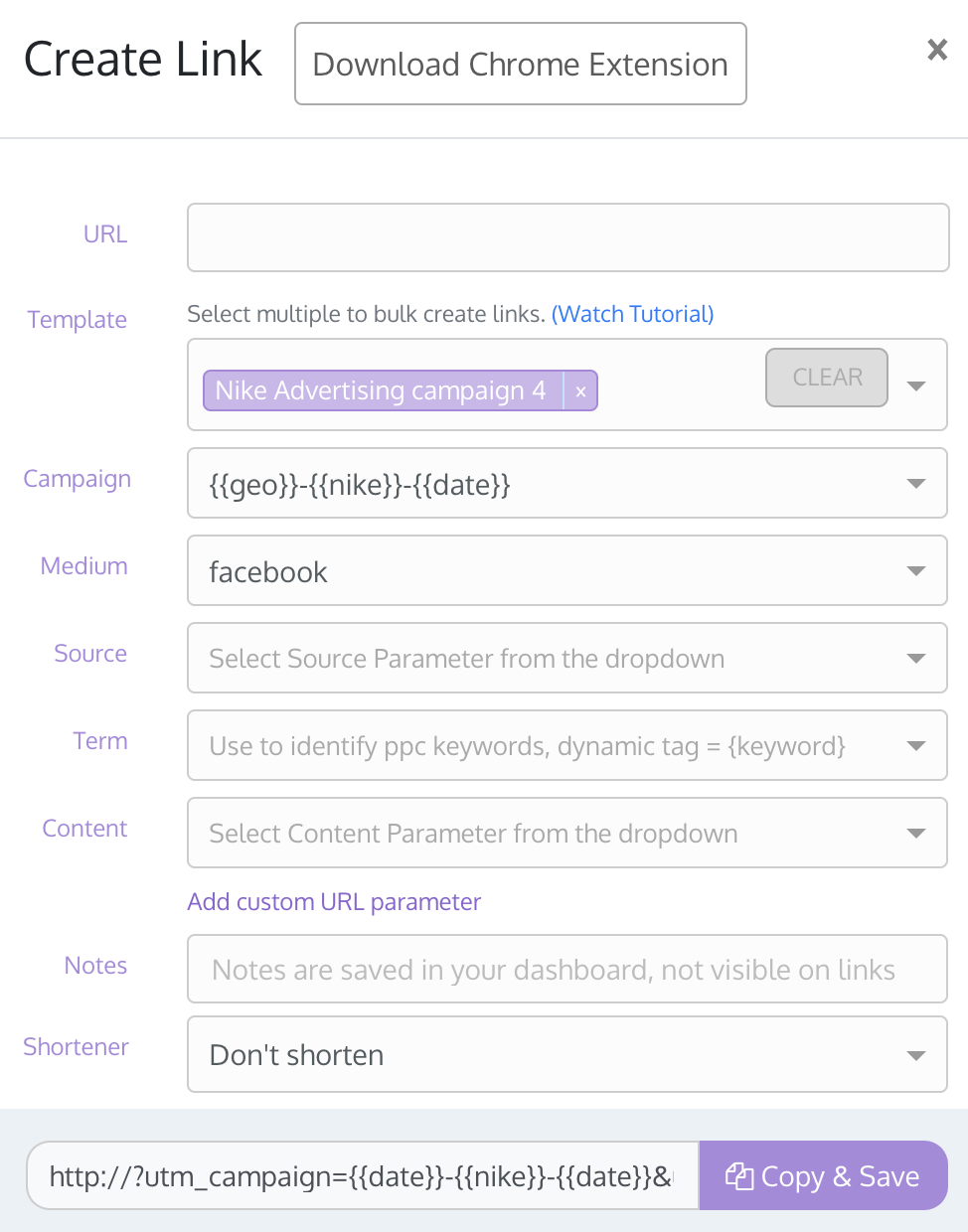
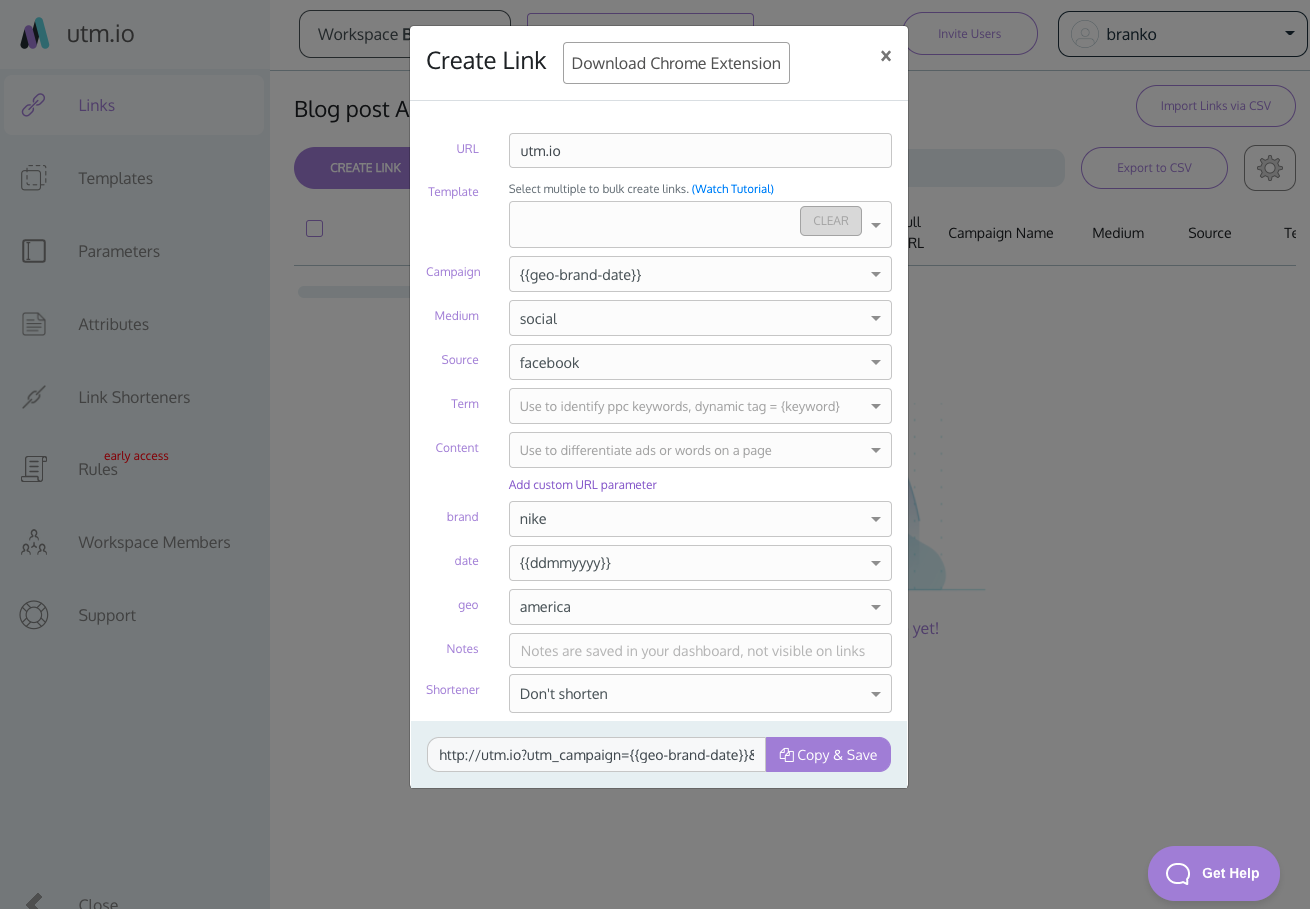
Parameters that use dynamic fields for advanced campaign naming conventions, in the UTM.io tool interface.
Naming Conventions Best Practices
The real challenge in UTMs lies in their organization, creation, and consistent usage. That said, there are useful guidelines that will help you avoid many of the most common mistakes and get the most out of your campaigns.
- Lower Case: Since Google Analytics is case-sensitive, you’ll need to be consistent in your use of capitalization. We recommend nixing caps altogether.
- Stick with Dashes, Not Underscores: Dashes make for cleaner reporting. Stick with the once you start using them, this is one of the parts of UTMs you want to be consistent about.
- Emphasize Readability: Short, simple naming rules are best. When UTMs are read out loud, they should describe how a user arrived at this particular page. A user from Twitter clicked a link to our blog post, which was a part of our summer demo campaign.
- Use GA Default Channel Groupings: Helpful and well-rounded; you should only customize groups if you’re committed to tracking them long term.
- Avoid Redundancies: No two parameters in the same UTM should look alike; this most often happens with the source and medium parameters.
The most damaging mistake is tagging internal links with UTM parameters. When a visitor clicks an internal link with UTMs, it starts a new session and erases their original traffic source – often attributing paid conversions to “direct” or your own site. Reserve UTM tracking exclusively for external marketing campaigns.
Your Turn
Make your marketer’s life easier AND make your reporting quicker & more granular at the same time by using the best tool for the job. Improve your workflow, and better optimize the ROI or ROAS of your complex campaigns.
Make using advanced UTM naming conventions easy for yourself and your team.
Try UTM.io
