You open Google Analytics and find the same campaign four times.
| Built by | utm_campaign |
|---|---|
| Paid social team | 2026-q4-demand-gen |
| Agency partner | Q4-DemandGen |
| New hire | q4_demand_gen |
| Regional team | 2026-Q4-Demand-Gen |
One campaign, reported as four.
Your team knows the naming convention. You shared the documentation, covered it during onboarding, and you might even have a spreadsheet listing every approved value. And yet every new campaign introduces another variation.
This isn’t a training problem. It’s a process problem.
The reliable fix is removing the chance to get it wrong in the first place.
Key Takeaways
- UTM templates, also called UTM naming conventions or UTM conventions, are reusable parameter combinations your team applies across campaigns.
- Templates save time, but they are optional by default. Anyone can skip them and type their own values.
- UTM.io can make template selection required, and lock everyone to a default template.
- Workspace admins set it up once, and your naming convention holds without manual review.
What are UTM templates?
UTM templates, sometimes called UTM naming conventions or UTM conventions, are predefined combinations of UTM parameters that teams reuse across campaigns. Instead of entering source, medium, campaign and content by hand every time, marketers choose a template and the fields fill in automatically.
That delivers two immediate benefits:
- Faster link creation: no need to enter the same values over and over.
- More consistent naming: everyone starts from the same approved parameters, which makes attribution easier to trust.
At least, that’s the goal.
Why templates are not enough on their own
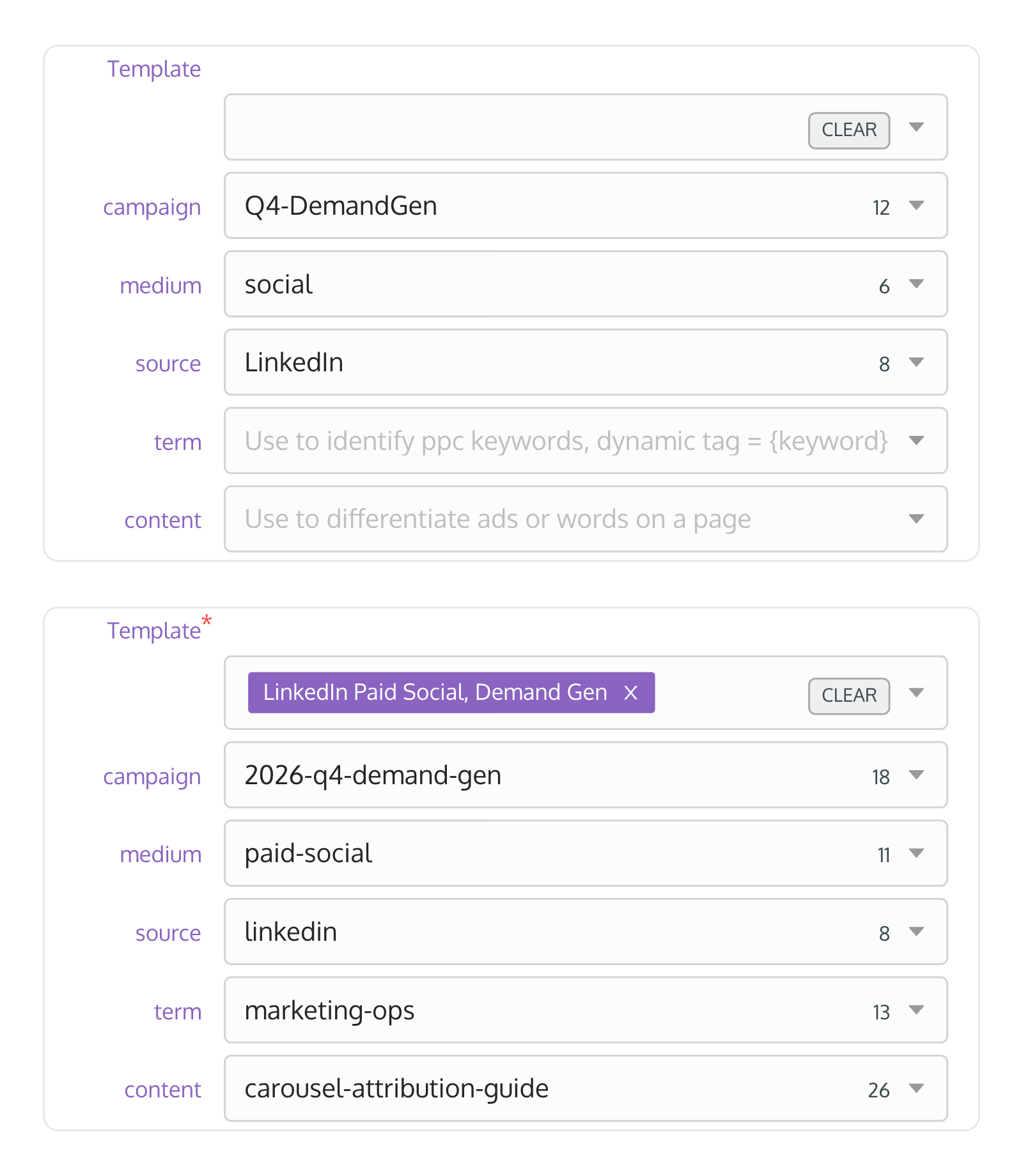
Templates are optional
UTM templates speed up link creation, but they don’t stop people from skipping them. Someone rushing to launch a campaign can ignore the template and type their own values. That one shortcut becomes tomorrow’s reporting problem.
The damage is almost invisible
To a person, 2026-q4-demand-gen and Q4-DemandGen are the same campaign. Your analytics treats them as two. One campaign’s results get split across rows, comparisons stop being reliable, and someone spends Monday cleaning dashboards. Worst of all, the numbers still look clean, so budget decisions get made on them.
Training cannot prevent human error
Most teams already have a style guide, a Notion page or a spreadsheet of approved values. Those help people get it right more often. They don’t make it impossible to get it wrong.
That works when two marketers build links. It breaks down when agencies, freelancers and regional teams are all building them every week.
How to make templates required
Templates let you set the parameters and capture the naming convention. Now, with required templates, naming conventions can be governed and stop being just documentation.
In UTM.io, open Rules and go to Workspace Settings. Three settings sit there, and each one builds on the last.
1. Require template selection in link builder. Nobody in the workspace can save a link in the link builder without choosing one of your approved templates. The template fills in the values, so the standard version is also the easiest one.
2. Choose the default template for your workspace. The link builder pre-selects your default, so the most common case takes no decision at all.
3. Do not allow members to select different templates. The template picker locks to your default. Members see “Template selection is managed by your admin”.
With the first setting on, every link starts from an approved template. With all three on, a new hire, a contractor or an agency partner starts from the same template every time, from their very first link.
Two more settings on the same page finish the job. Force all campaigns parameters to lowercase ends the google versus Google split for good. The Rules table controls which values each field allows, so the parameters themselves are governed, not just the starting point.
Available on the Plus, Professional, Business and Enterprise plans.
Want to try it on your own links? New accounts come with default templates and a trial that includes this feature, so you can switch the requirement on in your first session.
Start free or book a demo for a walkthrough with our team.
Who benefits most?
- Marketing Operations: one naming standard across every business unit, without reviewing each link before launch.
- Agencies: every client team builds campaign URLs the same way, without anyone reading a style guide first.
- Enterprise marketing teams: one convention that holds across products, regions and outside partners.
Frequently asked questions
What’s the difference between UTM templates and UTM naming conventions?
A naming convention is the standard your team agrees to follow. A UTM template is the reusable shortcut that helps people apply that standard consistently.
Can UTM templates be enforced?
In UTM.io, yes. Turn on Require template selection in link builder and no link can be saved in the link builder without an approved template. Add a locked default template and everyone starts from the same one.
Does this work with Google Analytics 4?
Yes. It keeps your UTM parameters consistent before they reach GA4, which means cleaner attribution and easier reporting.
Can agencies and contractors use the same templates?
Yes. Anyone who is a member of your UTM.io workspace works from the same approved templates, whether they’re internal or external.
Get it set up
If your team builds UTM links across multiple people or campaigns, requiring templates is worth the few minutes it takes. Set it up once and your naming conventions hold from that point forward.
Stop wasting hours cleaning attribution.
- Keep attribution clean and consistent.
- Prevent UTM errors before they reach your reports.
- Make it easy to adhere to your campaign naming standard.
Not ready yet? Start with our UTM naming conventions guide.
